Zapier
Mass-market automation platform for workflows, agents, chatbots, forms, and data-driven business systems across a very broad app ecosystem.
Used by 3M+ organizations
Recommended Fit
Best Use Case
Non-technical users and small businesses connecting 6000+ apps with simple no-code automations.
Zapier Key Features
Pre-built Connectors
Hundreds of ready-to-use connectors for popular SaaS apps.
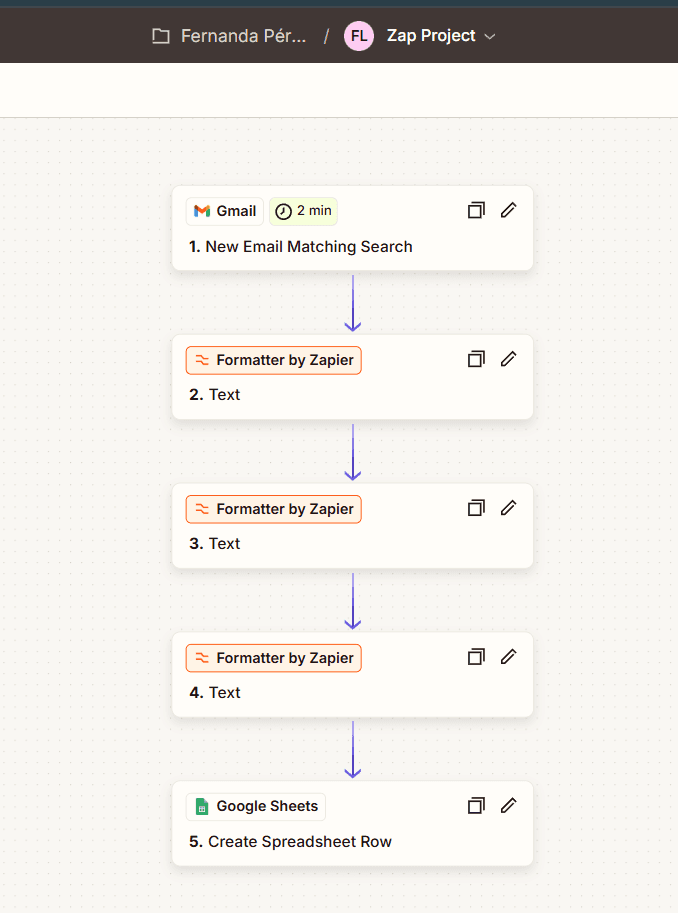
Visual Workflow Builder
Data Mapping
Transform and map data between different app formats automatically.
Webhook Triggers
Start workflows from incoming webhooks and API calls.
Scheduled Runs
Run integrations on schedule with cron expressions or intervals.
Zapier Top Functions
Overview
Zapier is a production-grade automation platform that connects over 6,000 applications without requiring code. It operates as a visual workflow builder where users define triggers (events that start automations), actions (tasks that execute), and conditional logic through an intuitive interface. The platform handles data mapping, API authentication, and execution scheduling across enterprise and consumer applications alike, making it the de facto standard for non-technical business process automation.
The core strength lies in Zapier's breadth: it integrates with everything from Salesforce and HubSpot to Slack, Gmail, Stripe, Notion, and thousands of SaaS tools. Each integration is pre-built with mapped fields and tested workflows, eliminating the friction of raw API documentation. Zapier manages rate limits, retry logic, and error handling automatically, which significantly reduces operational overhead compared to custom integration code.
Key Strengths
Zapier's visual editor removes technical barriers entirely. You construct workflows by clicking to add triggers and actions, mapping output from one step as input to the next. The platform supports conditional branches (if-then logic), loops, and multi-step sequences—powerful enough for CRM data syncing, lead qualification, invoice processing, and customer support workflows. The formatter tools let you transform data on-the-fly without touching code.
Reliability and transparency are built in. Zapier provides task history for every automation, showing exactly what data moved where and when. Webhooks enable real-time triggers from external systems, while scheduled runs support periodic tasks like daily database reconciliation. For developers integrating Zapier into applications, the API and Webhook features allow bidirectional communication, enabling Zapier to act as a glue layer between custom systems.
- Pre-built app connectors eliminate API integration work
- Multi-step workflows with conditional logic and loops
- Task history and execution logs for full visibility
- Webhook triggers for real-time event-driven automation
- Free tier supports up to 100 tasks/month with basic features
Who It's For
Zapier is purpose-built for non-technical users: marketers automating lead workflows, operations teams syncing databases, and small business owners connecting their tools without hiring developers. It's equally valuable for agencies managing multiple client automations and mid-market teams handling high-volume, repetitive processes. Developers use Zapier to prototype integrations, handle low-throughput data movements, or supplement custom infrastructure.
Organizations with modest automation budgets benefit most from the freemium model, though serious production use requires paid plans ($20–$599/month) depending on task volume. Teams already invested in Zapier's ecosystem (using Zapier Tables, Zapier Forms, or Zapier AI) gain operational advantages from the unified platform. Conversely, enterprises with custom APIs, unique data models, or extreme throughput needs may find integration platforms like Workato or native API solutions more cost-effective.
Bottom Line
Zapier remains the market leader in accessible, broad-spectrum workflow automation. Its strength is breadth and ease of use, not raw power: it excels at connecting standard SaaS tools but struggles with complex data transformations, high-frequency processing (millions of tasks monthly), or proprietary system integration. For most businesses under 10,000 monthly tasks, Zapier is the fastest path from problem to solution.
Consider Zapier if your automations involve standard business tools (CRM, email, messaging, spreadsheets, payment platforms) and your team wants to avoid custom development. If you're building unique, complex orchestrations or need sub-second latency and massive scale, explore lower-level platforms or custom code. For typical SMB and mid-market use cases—customer onboarding, lead routing, data synchronization—Zapier is the pragmatic default choice.
Zapier Pros
- Connects 6,000+ pre-built app integrations without writing API code, eliminating authentication and data mapping friction entirely.
- Free tier supports 100 tasks/month with full access to two-step workflows, making it viable for small business experimentation at zero cost.
- Visual workflow builder with conditional logic, loops, and multi-step sequences enables complex automations for non-technical users without requiring programming knowledge.
- Task history and detailed execution logs provide complete visibility into what data moved where, when, and why—critical for compliance and debugging.
- Webhooks enable real-time triggers from external systems and custom applications, making Zapier a viable glue layer for hybrid architectures.
- Scheduled runs support recurring automations (daily, weekly, monthly), handling background jobs like data syncing and report generation without server infrastructure.
- Formatter tools allow on-the-fly data transformation (text case, date formatting, calculations, JSON parsing) without custom code or intermediate steps.
Zapier Cons
- Pricing scales quickly: beyond 10,000 monthly tasks, costs ($599/month) rival custom integration development, making it expensive for high-volume workflows.
- Complex data transformations and conditional logic remain manual and verbose compared to code; advanced Zaps become difficult to maintain and test.
- No native support for loops or bulk operations means processing large datasets is inefficient; moving 100,000 records requires expensive, slow individual transactions.
- Limited to standard SaaS tools and public APIs; custom or proprietary systems may require Webhook workarounds, adding integration complexity.
- Rate limiting and throttling on high-volume tasks can cause delays or failed executions without recourse to parallelization or queue management.
- Error handling is basic: retries, dead-letter handling, and circuit-breaking require manual step configuration rather than platform-level guarantees.
Get Latest Updates about Zapier
Tools, features, and AI dev insights - straight to your inbox.
Zapier Social Links
Large user community with official forums and documentation
Need Zapier alternatives?
Zapier FAQs
Latest Zapier News

Zapier Introduces Web Search Feature to Enhance Workflows

Zapier's New Web Reader Feature: Enhancing Workflow Automation

Zapier's Natural Language Zap Builder: What It Means for Automation Work

Zapier Lets You Route AI Through Your Own Provider Accounts
Zapier's Plain Language Zap Builder: What Automation Operators Need to Know
Zapier Lets You Bring Your Own AI: What Builders Need to Know